Ships in 11 days Shipping to United Kingdom only £ 5.99!
IN STOCK – ships in 11 days
At MemoryC we have multiple warehouses. This product is available to be transferred to the warehouse nearest your location, and is estimated to ship within 11 days from your order.
Shipping Location
Enter new post code to refresh estimated delivery time.
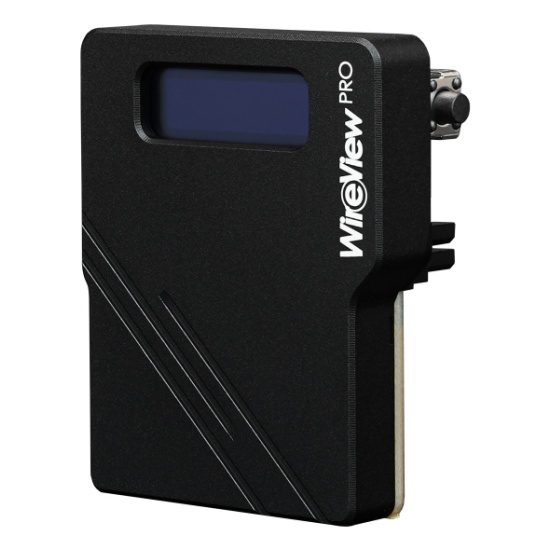
The 90° WireView Pro GPU is a device for measuring the power consumption of graphics cards. Developed in collaboration with Jon "elmor" Sandström, the 90° WireView Pro GPU connects to the 12VHPWR power connector of the graphics card and is linked to the power supply via the power cable. Power consumption data is displayed on an OLED screen. The Pro version features connector detection and temperature sensors, as well as a buzzer that emits an acoustic warning signal when the adjustable temperature and current threshold is exceeded, or when a cable is improperly connected or of the wrong specification.
The 90° version of the WireView Pro GPU functions as a 90° adapter, allowing the PSU connection cable (when the GPU is horizontally mounted) to be routed downward towards the case floor. Previous versions used a U-shaped adapter, where the power cable runs over the GPU’s backplate.
Power consumption measurement made easy The 90° WireView Pro GPU enables the measurement of graphics card power consumption through the 12VHPWR power connector and records the data to determine energy usage. These readings can be used to calculate GPU power costs or compare power consumption across different graphics cards. A special measurement cycle of the last 60 seconds allows for a quick and convenient display of power consumption, making it ideal for hardware reviews. Additionally, GPU power consumption can be tracked over time or during specific workloads. The device also detects power peaks, which can occur during operation with high-end graphics cards.
Greater safety with sensors and warning alerts With connector detection, temperature sensors, and an acoustic alarm, the Pro version includes additional safety features. The connector detection of the 90° WireView Pro GPU determines whether a 150W, 300W, 450W, or 600W power cable is in use. It is important to note that the 90° WireView Pro GPU only measures power consumption via the power connector and does not account for additional power drawn through the PCIe slot. If an incorrect cable is used or a loose connection is detected, an alarm will sound.
Precise temperature control Two temperature sensors located on the board at the power connectors monitor the temperatures at the power connectors. Up to 600 watts of power can flow through the connectors, which can cause them and the board around them to heat up significantly. An audible alarm will sound if the temperature exceeds an adjustable limit. Two additional included temperature sensors (10K NTC) can be connected via cables. Two sensors with cable lengths of 5 cm and 20 cm are included. The alarm can also be triggered if the adjustable current limit (amps) is exceeded.
The 90° WireView Pro GPU displays measured values on the OLED screen. A button allows users to switch between displayed values, including:
- Current power consumption in watts (W); - Current voltage in volts (V), current in amperes (A); - Minimum and maximum power consumption in watts (W); - Average power consumption over 60 seconds (RAVG in W) and total power consumption (E in Wh); - Measured temperatures of individual temperature sensors (°C).
Vertical GPU Mounting and 90° WireView Pro GPU The 90° WireView Pro GPU can be used with vertically mounted graphics cards. Depending on the selected variant, the power cable from the power supply unit is routed either toward the case’s mainboard tray or toward the side panel:
- If the “R” variant is required for a standard horizontal GPU installation, the power cable will be routed toward the side panel when the GPU is mounted vertically. - If the “R” variant is required for a standard horizontal GPU installation, the power cable will be routed toward the mainboard tray when the “N” variant of the 90° WireView Pro GPU is used for vertical mounting.
The display orientation of the OLED screen on the 90° WireView Pro GPU can be adjusted via the configuration menu. Refer to the flowchart available in the download section on the product page in the Thermal Grizzly Shop.
User Reviews
No reviews yet
Add your review
Cookies help us deliver the best experience on our website. By using our website, you agree to our use of cookies. Learn more