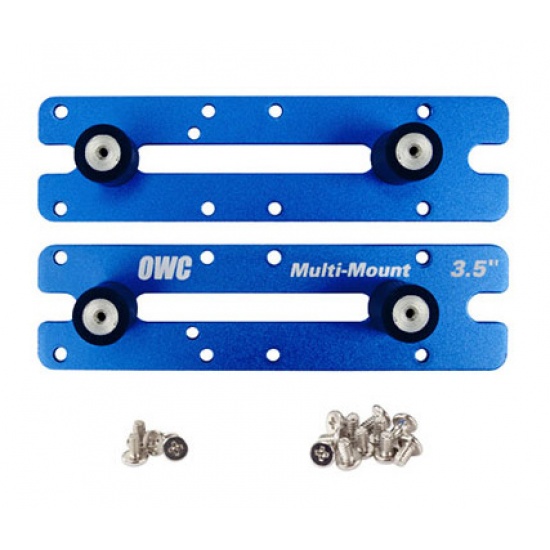
OWC Multi-Mount® 3.5" to 5.25" bracket set for 2009-2012 Mac Pro "Nehalem" or "Westmere" Models by OWC
- Be the first to review
- Item Number: 15809
- Part Number: OWCMM52T35MP9
No longer available. See alternative options
Key Features
- Install one 3.5" hard drive in the spare optical drive bay of your 2009-2012 MacPro.
- Vibration dampeners reduce noise emittance from traditional platter-based drives.
- 100% powder-coated aluminum helps dissipate drive heat.
- Designed for Use in Mac or PC
- All hardware including screws provided.
- Hard Drives Available Separately.
See product description
Similar Products
-
 OWC In-line Digital Thermal Sensor for Hard Drive Upgrade for 27" iMacs 2012 and Later
IN STOCK
£ 34.68 (incl. VAT) -
 OWC Complete Hard Drive Upgrade Kit Including Tools for all 27" iMacs 2012 & Later
IN STOCK
£ 37.99 (incl. VAT) -
 NEON Soft Silicone Protective Case for 3.5-inch hard drive / SSD - Blue
IN STOCK
£ 3.23 (incl. VAT) -
 OWC Mercury Helios 3S Thunderbolt 3 PCIe Expansion Solution
IN STOCK
£ 235.90 (incl. VAT) -
 OWC DIY Bundle - General Servicing Kit for Apple iMac 2007 and later Models
IN STOCK
£ 34.68 (incl. VAT) -
 OWC In-line Digital Thermal Sensor for iMac Late 2009 - Mid 2010 Hard Drive Upgrade
IN STOCK
£ 30.27 (incl. VAT) -
 NewerTech AdaptaDrive 2.5" to 3.5" Drive Converter Bracket
IN STOCK
£ 13.78 (incl. VAT) -
 NEON Hard Protective Storage Case for 2x 2.5-inch hard drives / SSDs - Orange
IN STOCK
£ 3.66 (incl. VAT) -
 NEON Hard Protective Storage Case for 2x 2.5-inch hard drives / SSDs - Grey
IN STOCK
£ 3.66 (incl. VAT) -
 NEON Hard Protective Storage Case for 2x 2.5-inch hard drives / SSDs - Blue
IN STOCK
£ 3.66 (incl. VAT) -
 OWC Internal SSD DIY Kit for All Apple 27" iMac 2011 Models
IN STOCK
£ 12.00 (incl. VAT) -
 NEON IDE to SATA interface converter incl IDE + SATA data and power cables (Horizontal)
IN STOCK
£ 4.06 (incl. VAT) -
 OWC Internal SSD DIY Kit for All Apple 27" iMac 2010 Models
IN STOCK
£ 11.34 (incl. VAT) -
 NEON SATA to PATA/IDE and PATA/IDE to SATA Hard Drive Interface Dual-Adapter with SATA+power cable
IN STOCK
£ 4.54 (incl. VAT) -
 OWC General Servicing Kit for All 21.5" Apple iMac 2012 and later
IN STOCK
£ 15.90 (incl. VAT)
Details
Looking to add more storage space to your 2009-2012 Mac Pro? The spare optical drive bay is equipped already with the cables you need to install a 5th hard drive. The only question that remains is how to mount a 3.5" drive in a 5.25" bay. Well, OWC has you covered with the Multi-Mount.
With this set of high-quality powder-coated aluminum brackets, you now have the freedom to install the drives you want, where you want them!
The 2.5" to 3.5" bracket is designed for use with the 3.5" to 5.25" bracket or in bays where standard, separate connection cables are used. Compatible with side mounted bays. Not compatible with front mounted bays like those in the Mac Pro. Installation Notes:
1. To utilize two 3.5″ drives in a Mac Pro, the Multi-Mount must be installed in the lower optical drive bay along with removing the top optical drive for proper clearance. However, using one 2.5″ and one 3.5″ drive with the Multi-Mount allows it to fit into a single optical bay and doesn't require the removal of the upper optical drive.
2. Pre-2013 Mac Pros are limited to a total of two SATA connections in the optical bay. If four SATA devices are installed in the bay, only two may be connected at any given time. This is a limit of the Mac Pro's architecture.
Specifications
| COLOUR | Blue |